

This guide uses complete
provider/model IDs returned by /v1/models, such as aliyun/kimi-k3. The actual list depends on the HiLinkup console and the response fetched by CC Switch.Before you start
Prepare:- CC Switch installed and open.
- A HiLinkup API key.
- HiLinkup request URL:
https://api.hilinkup.com/v1 - At least one model that supports Claude Messages-compatible calls.
- macOS / Linux
- Windows PowerShell
Add HiLinkup as a provider
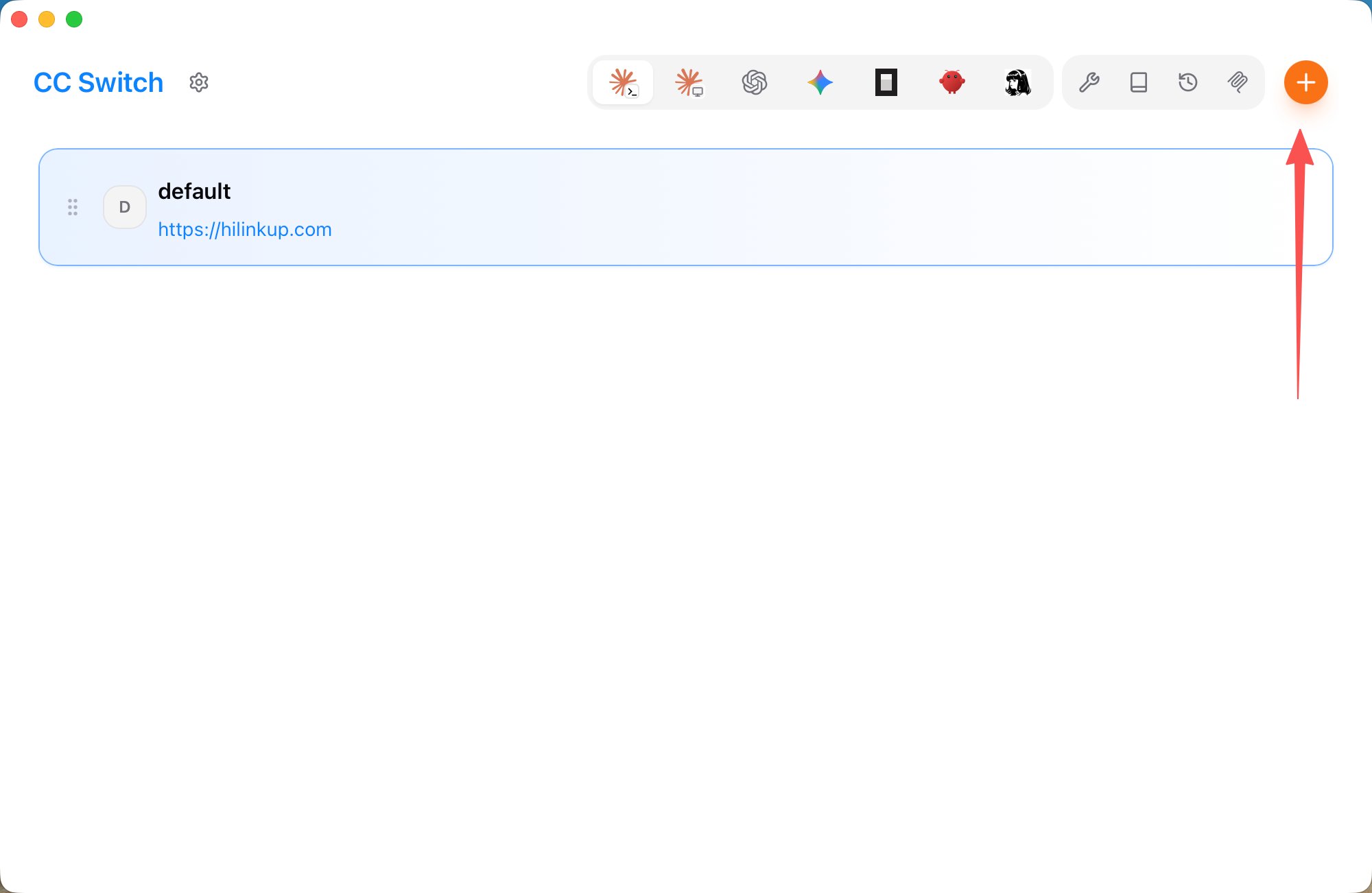
1
Open provider management
Open CC Switch and select Claude Code in the app switcher. The official docs describe the app switcher as the place to switch between Claude, Claude Desktop, Codex, Gemini, OpenCode, OpenClaw, Hermes, and other supported apps.
2
Add a provider
Click the
+ button in the upper-right corner to open the add-provider page.3
Choose the provider type
Select “App-specific Provider”. If your CC Switch version supports “Universal Provider”, you can use it for shared config across apps; this guide uses a Claude Code-specific provider.
4
Fill in provider details
Use these values:
5
Confirm the auth field
Keep the default auth environment variable as
ANTHROPIC_AUTH_TOKEN. CC Switch writes the key into the corresponding provider config.6
Save the provider
Click Add or Save. Return to the provider list and confirm that HiLinkup appears.
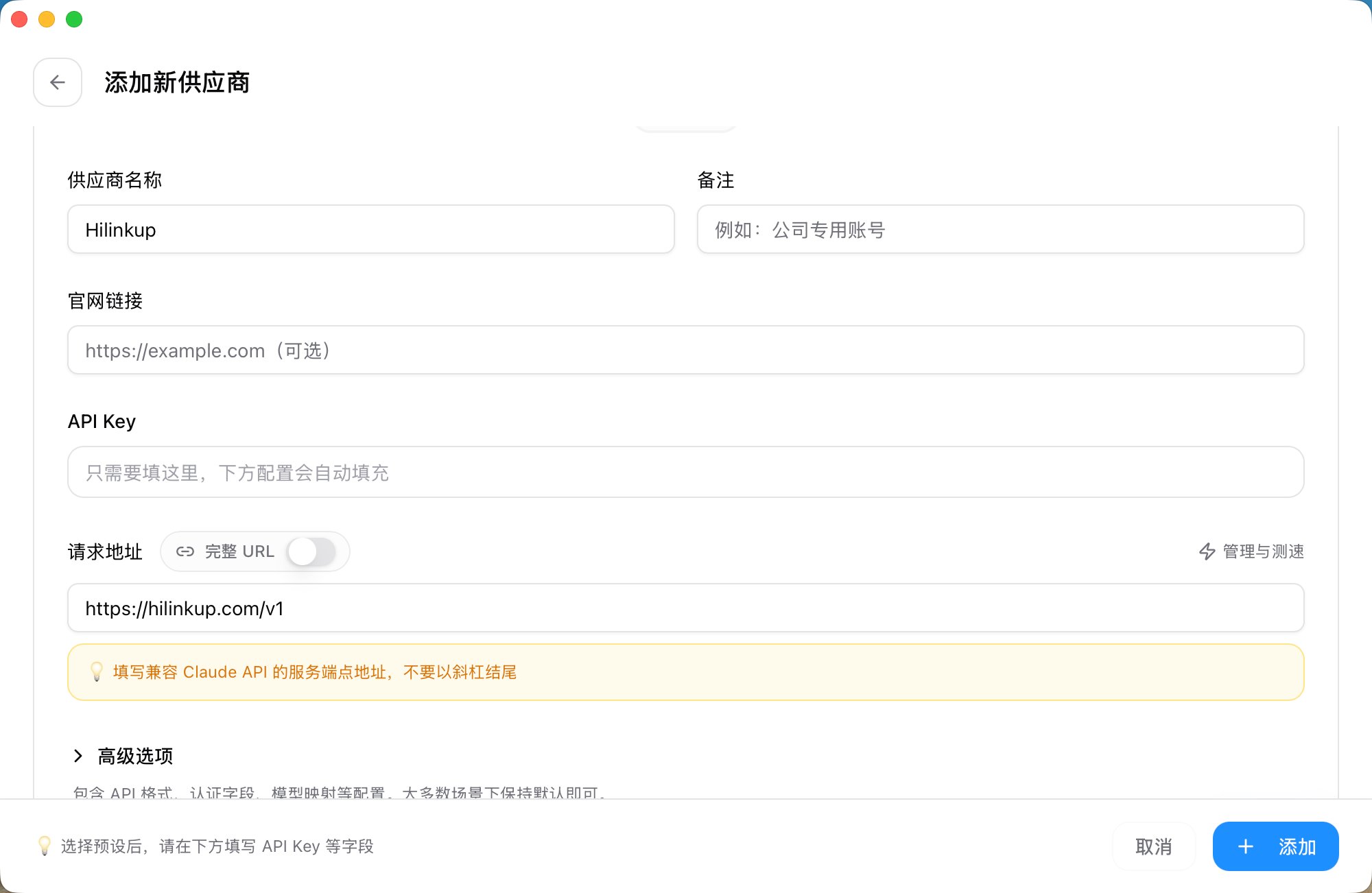
Use the Claude-compatible server URL and avoid a trailing slash. The recommended request URL is
https://api.hilinkup.com/v1.Fetch models and map roles
After adding the provider, open the HiLinkup edit page in CC Switch.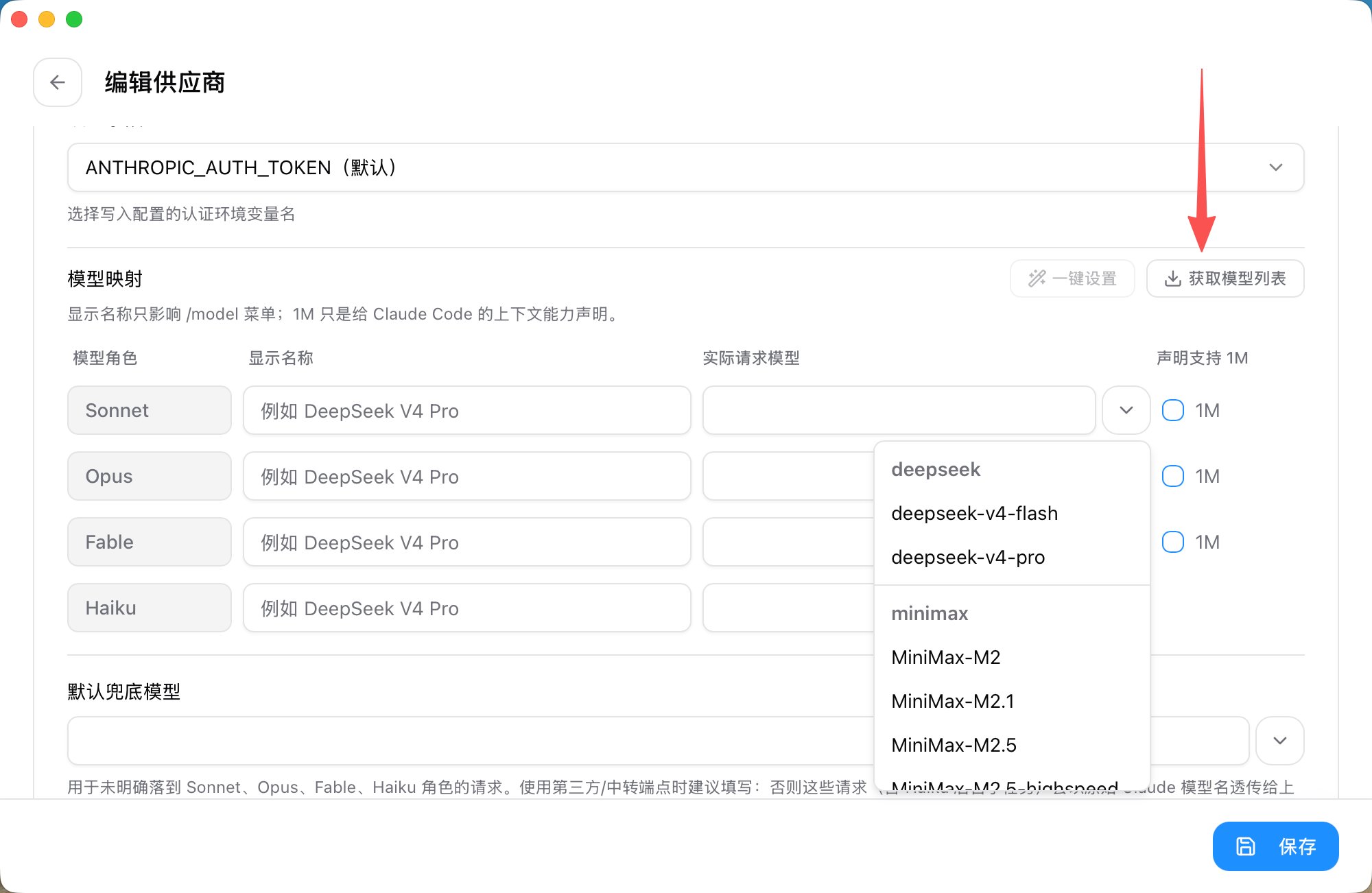
1
Fetch the model list
Click “Get model list”. The official docs state that CC Switch uses the configured API key to call the OpenAI-compatible
/v1/models endpoint and then shows models in a grouped dropdown.2
Map Sonnet
For
Sonnet, choose a complete ID returned by /v1/models, such as aliyun/kimi-k3.3
Map Opus
For
Opus, choose a complete model ID that you have verified for Claude Messages and the capabilities you need. You can use aliyun/kimi-k3 for the initial setup.4
Map Fable and Haiku
For
Fable and Haiku, select complete IDs that are present in the fetched list and verified for this protocol. For the first connection test, you can map all roles to aliyun/kimi-k3.5
Set a fallback model
Choose a stable default fallback model. Requests that do not clearly map to Sonnet, Opus, Fable, or Haiku will use this model.
6
Save the mapping
Click Save and return to the CC Switch provider list.
Recommended mapping
Switch to HiLinkup
1
Return to the provider list
Find the
HiLinkup provider on the CC Switch home screen.2
Set it as the active provider
Select HiLinkup. Confirm that the active provider is
HiLinkup and the request URL shows https://api.hilinkup.com/v1.3
Confirm it takes effect
The official docs state that Claude Code supports hot reload, so switching providers usually takes effect immediately. If requests still use the old provider, close and reopen Claude Code.
4
Send a test prompt
In Claude Code, send:
Verification order
Test in this order instead of starting with a complex agent task:- Plain text question.
- Read the current directory structure.
- Read one non-sensitive file.
- Make one small change in a temporary directory or temporary branch.
- Test long context, tool use, and multi-file edits.
Common issues
Get model list fails
Get model list fails
Check that the API key is a HiLinkup key and that the request URL is
https://api.hilinkup.com/v1. Browser or system proxy settings can also cause an empty model list.Models appear, but Claude Code requests fail
Models appear, but Claude Code requests fail
A model returned by
/v1/models is not guaranteed to support Claude Messages-compatible calls. Switch to a model that explicitly supports Claude Code or Claude Messages, or verify with the Claude Messages cURL example first.Claude Code still uses the old provider
Claude Code still uses the old provider
Claude Code usually hot-reloads config. If it still uses the old provider, first confirm that HiLinkup is the active provider; if it still does not apply, close and reopen Claude Code.
Should the request URL include /v1?
Should the request URL include /v1?
Use
https://api.hilinkup.com/v1 in the CC Switch provider request URL. If your CC Switch version explicitly says not to include /v1, use https://api.hilinkup.com. Do not use the website domain for API requests.How should I choose model mappings?
How should I choose model mappings?
Start stable: use the same reliable model for Sonnet and the fallback model; use a stronger model for Opus; use faster or lower-cost models for Fable and Haiku. Tune later based on latency, cost, and success rate.